Sync Bank Transactions to Notion Databases
Turn your Notion workspace into a powerful financial command center. Automatically sync bank transactions to Notion databases with custom property mapping, smart categorization, and real-time updates from 12,000+ banks.
Free forever for personal use • No credit card required • Setup in under 2 minutes
5.0 stars on Google Workspace Marketplace
Trusted by finance teams and developers
1,000+
Active users
1M+
Transactions synced
Enterprise
Security & compliance
Why Sync to Notion?
Powerful features designed specifically for Notion users.
Custom Property Mapping
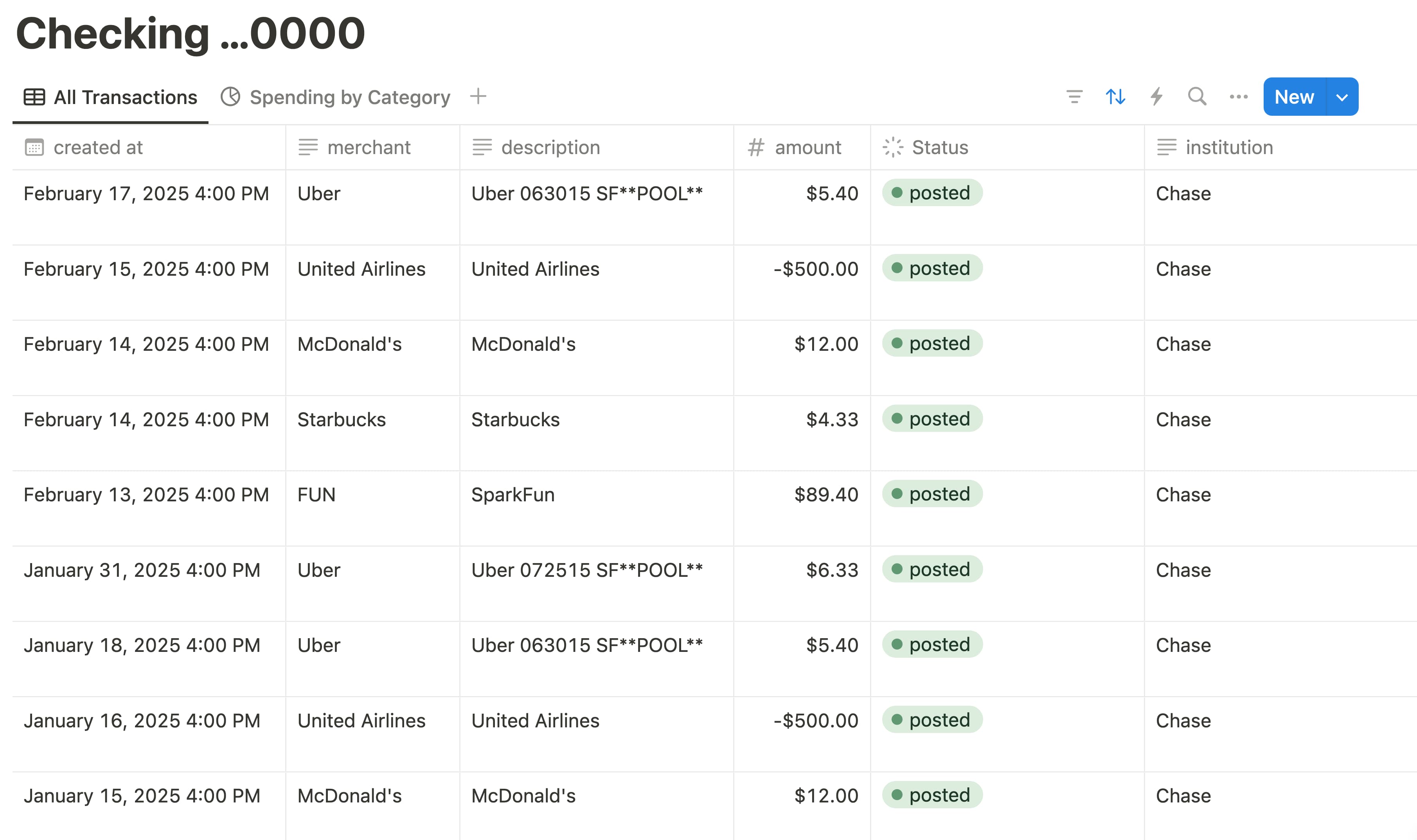
Map bank transaction fields to any Notion database property. Choose exactly which data appears in which columns — amounts, dates, categories, merchant names, and more.
Automatic Database Sync
New transactions automatically appear as new rows in your Notion database. Modifications and deletions are synced too, keeping your data always up to date.
Customizable Database Views
Leverage Notion's powerful views — table, board, calendar, gallery, and timeline — to visualize your financial data exactly how you want.
Smart Categorization
Transactions are automatically categorized by type. Use Notion's select and multi-select properties to organize, tag, and filter your expenses effortlessly.
Relation & Rollup Support
Connect your transaction database to other Notion databases using relations. Use rollups to calculate totals, averages, and summaries across linked data.
Works With Your Existing Setup
Sync to any existing Notion database or let Finicom create one for you. Your existing Notion workflows, automations, and templates keep working as before.
Official Notion Integration
Finicom is available on the Notion Integration Gallery. Connect your Notion workspace in one click and start syncing bank transactions to your databases instantly.
Get Started in Minutes
Three simple steps to sync your bank transactions to Notion.
Connect Your Bank
Sign up for free and securely connect your bank account through Plaid. We support 12,000+ banks including Chase, Bank of America, Wells Fargo, and more.
Link Your Notion Workspace
Authorize Finicom to access your Notion workspace and select the database where transactions should appear. Map properties to customize the data layout.
Track Your Finances
Transactions flow automatically into your Notion database. Use filters, sorts, views, and formulas to build your perfect financial tracking system.
Popular Use Cases
See how others use Finicom with Notion to manage their finances.
Personal Finance Tracker
Build a comprehensive personal finance database in Notion. Track spending by category, set budget goals, and review monthly summaries with custom views.
Business Expense Dashboard
Create a centralized expense management system for your team. Track expenses, categorize spending, and generate reports using Notion's built-in tools.
Budget & Category Tracking
Organize transactions with tags, categories, and custom properties. Use Notion's board view to visualize spending by category and track budget targets.
Enterprise-Grade Security
Your financial data is always protected. Finicom never stores your transaction data permanently.
Bank-Grade Encryption
256-bit AES encryption for all data in transit
Zero Data Storage
We transmit, never store your financial data permanently
Real-Time Sync
Data flows directly from your bank to your app
2-Year History
Access up to 2 years of transaction history on all plans
Bank Transactions Synced
Active Users
Supported Banks
Frequently Asked Questions
How do I automatically sync bank transactions to Notion?
Sign up for Finicom, connect your bank through our secure Plaid integration, then authorize your Notion workspace. Choose a database (or let us create one), map your properties, and transactions will automatically sync as they appear in your bank.
Can I customize which properties are synced?
Yes! Finicom supports full property mapping. You can map transaction fields (date, amount, merchant name, category, etc.) to any Notion database property type including text, number, select, date, and more.
Does it work with existing Notion databases?
Absolutely. You can sync to any existing Notion database. Just map the transaction fields to your existing properties. You can also let Finicom create a new database with the optimal schema for financial tracking.
Is it free to sync bank data to Notion?
Yes! Finicom offers a free-forever plan that lets you connect one bank (Mercury Bank) with unlimited transactions and destinations. Paid plans start at affordable prices for connecting additional banks from 12,000+ supported institutions.
Which banks are supported?
Finicom supports 12,000+ banks and financial institutions across the US and Canada through Plaid, including Chase, Bank of America, Wells Fargo, Citi, Capital One, and many more. The free plan supports Mercury Bank.
Is my bank data secure?
Absolutely. Finicom uses bank-grade 256-bit encryption and never permanently stores your financial data. We operate as a secure data transmission pipeline — data flows directly from your bank to Notion and is not retained on our servers.
Other Destinations
Finicom also syncs your bank transactions to these platforms.