Sync Bank Transactions to Google Sheets Automatically
Use custom formulas like =FINICOM_GET_TRANSACTIONS() to pull live bank data directly into your spreadsheets. Build powerful financial dashboards, track expenses, and automate reports with real-time data from 12,000+ banks.
Free forever for personal use • No credit card required • Setup in under 2 minutes
5.0 stars on Google Workspace Marketplace
Trusted by finance teams and developers
1,000+
Active users
1M+
Transactions synced
Enterprise
Security & compliance
Why Sync to Google Sheets?
Powerful features designed specifically for Google Sheets users.
Custom Formulas Extension
Install our Google Workspace add-on and use formulas like =FINICOM_GET_TRANSACTIONS() and =FINICOM_GET_BALANCES() to query live financial data directly in your cells.
Automatic Transaction Import
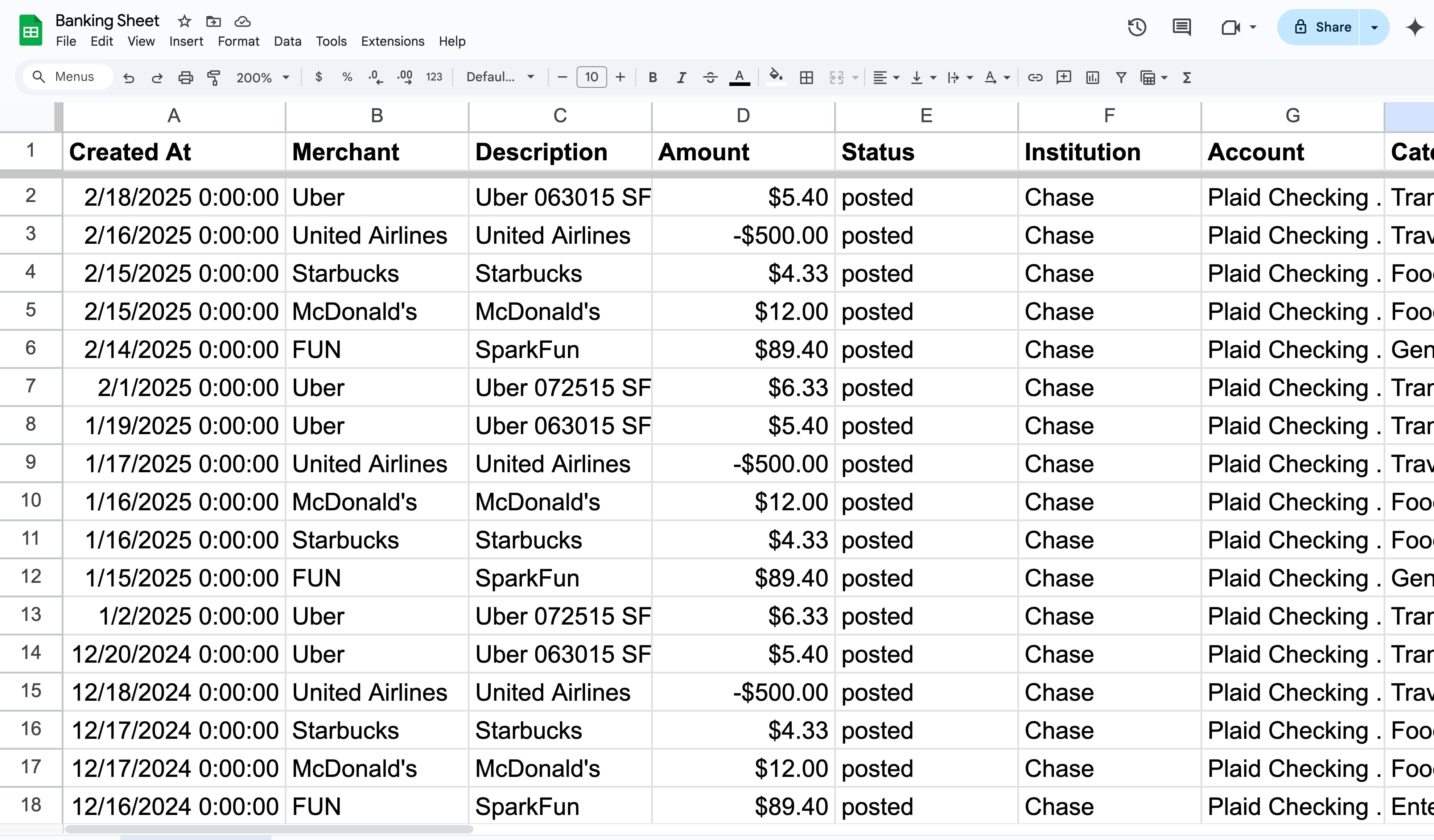
New transactions are automatically synced to your spreadsheet as they appear in your bank. No manual data entry or CSV exports needed.
Custom Spreadsheet Templates
Start with pre-built templates for expense tracking, cash flow analysis, budget management, and more. Or build your own from scratch.
Real-Time Financial Dashboards
Combine Google Sheets charts with live bank data to create dashboards that update automatically. Monitor spending, income, and trends at a glance.
Smart Filtering & Categories
Filter transactions by date range, amount, category, or custom rules. Only sync the data you need to keep your spreadsheets clean and organized.
Multi-Account Support
Sync multiple bank accounts to a single spreadsheet or separate sheets. Perfect for tracking personal and business finances side by side.
Google Workspace Custom Formulas
Install our free Google Sheets add-on to use powerful custom formulas like =FINICOM_GET_TRANSACTIONS() directly in your spreadsheets. Rated 5.0 stars on the Google Workspace Marketplace.
Get Started in Minutes
Three simple steps to sync your bank transactions to Google Sheets.
Connect Your Bank
Sign up for free and securely connect your bank account through Plaid. We support 12,000+ banks including Chase, Bank of America, Wells Fargo, and more.
Link Google Sheets
Connect your Google account and choose which spreadsheet to sync to. Install the Finicom custom formulas extension for even more power.
Watch Data Flow
Transactions automatically appear in your spreadsheet. Use formulas, charts, and pivot tables to analyze your financial data in real-time.
Popular Use Cases
See how others use Finicom with Google Sheets to manage their finances.
Expense Tracking
Automatically categorize and track business or personal expenses. Generate monthly expense reports without manual data entry.
Financial Dashboards
Build real-time dashboards with charts and graphs powered by live bank data. Monitor cash flow, spending trends, and budget targets.
Bookkeeping & Accounting
Simplify bookkeeping by auto-importing transactions. Reconcile accounts, prepare tax documents, and maintain accurate financial records.
Enterprise-Grade Security
Your financial data is always protected. Finicom never stores your transaction data permanently.
Bank-Grade Encryption
256-bit AES encryption for all data in transit
Zero Data Storage
We transmit, never store your financial data permanently
Real-Time Sync
Data flows directly from your bank to your app
2-Year History
Access up to 2 years of transaction history on all plans
Bank Transactions Synced
Active Users
Supported Banks
Frequently Asked Questions
How do I get bank transactions into Google Sheets automatically?
Sign up for Finicom, connect your bank account through our secure Plaid integration, and link your Google Sheets. Transactions will automatically sync to your spreadsheet as they appear in your bank. You can also use our custom formulas extension for on-demand data queries.
What are the custom formulas and how do they work?
After installing the Finicom add-on from the Google Workspace Marketplace, you can use formulas like =FINICOM_GET_TRANSACTIONS() and =FINICOM_GET_BALANCES() directly in your spreadsheet cells. These formulas pull live data from your connected bank accounts.
Is it free to sync bank data to Google Sheets?
Yes! Finicom offers a free-forever plan that lets you connect one bank (Mercury Bank) with unlimited transactions and destinations. Paid plans start at affordable prices for connecting additional banks from 12,000+ supported institutions.
Which banks are supported?
Finicom supports 12,000+ banks and financial institutions across the US and Canada through Plaid, including Chase, Bank of America, Wells Fargo, Citi, Capital One, and many more. The free plan supports Mercury Bank.
Is my bank data secure?
Absolutely. Finicom uses bank-grade 256-bit encryption and never permanently stores your financial data. We operate as a secure data transmission pipeline — data flows directly from your bank to Google Sheets and is not retained on our servers.
Can I sync multiple bank accounts to one spreadsheet?
Yes! You can sync multiple bank accounts to the same spreadsheet or different sheets within it. This is great for tracking personal and business finances in one place.
Other Destinations
Finicom also syncs your bank transactions to these platforms.
Ready to sync your bank to Google Sheets?
Get started for free. No credit card required.
View pricing plans